CNAS Advising
From orientation to graduation, Academic Advisors play a crucial role in helping you achieve your degree goals. We are committed to offering you academic guidance every step of the way throughout your undergraduate career. CNAS UAAC offers hybrid appointment options via the Slate Student Success Portal and general drop-in advising, also available both in person and online, through our General Undergraduate Advising Check-In's (GUAC) option. Please review the information below to learn more about how CNAS academic advising works.
Kind regards,
CNAS Undergraduate Advising Staff
How Advising Works
-
Advising Support - What is the Slate Student Success Portal?
Advising Support - What is the Slate Student Success Portal?
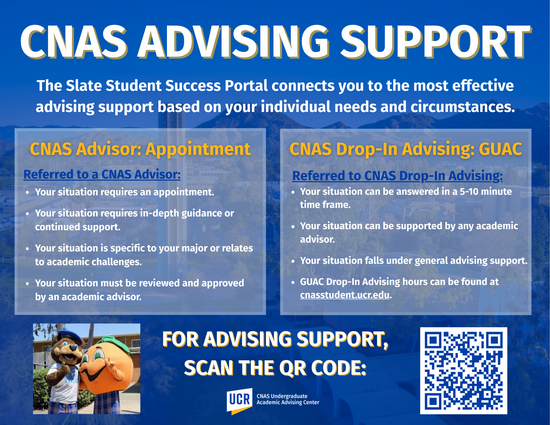
- The Slate Student Success Portal allows you to get connected with the most effective advising support based on your individual needs and circumstances.
- Newly admitted students will not have access to schedule appointments or access GUAC support until the start of their first quarter of attendance.
- The Slate Student Success Portal allows you to schedule appointments, as well as join the queue for a same day drop-in/GUAC support.
- The Slate Student Success Portal gives you access to your advisor's notes, as well as other campus resources like R'Web, Canvas, Degree Audit, Financial Aid, and the UCR Academic Calendar.
For step by step guidance on navigating the Slate Student Success Portal, please visit Slate Student Portal.
- The Slate Student Success Portal allows you to get connected with the most effective advising support based on your individual needs and circumstances.
-
Who to meet with?
Who to meet with?
- Upon admission to UCR, students are assigned an advisor.
- You can find your assigned advisor via your Student Profile on R'web and on the Slate Student Success Portal.
- You can find your assigned advisor via your CNAS Major page.
- To seek advising support you can visit the Slate Student Success Portal to get connected with the appropriate support.
-
Hybrid Availability
Hybrid Availability
- You can view your advisors' posted availability through the Slate Student Success Portal. Please review whether the advising appointment you are seeking is offered online or in-person, and select the option that best fits your preference.
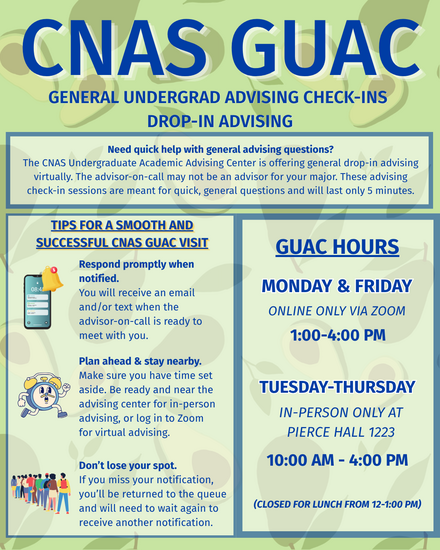
- Drop-in/GUAC advising is also available both online and in-person. Please review the Drop-in/GUAC flyer for additional details.
-
Scheduling an appointment
Scheduling an appointment
- You will be directed to schedule an Advising Appointment if your situation requires in-depth guidance and continued support.
- To schedule, click Advising/Student Success in R'Web and select ‘Advising Support’ on the left side. If on a cell phone click the hamburger icon (three horizontal lines stacked on top of each other) then select Advising Support. You will be directed to a series of questions that will connect you with the most effective advising support for you based on your needs. When you are viewing your advisor's availability, choose an available advising slot from the calendar options. These advising sessions can be 20 minute meetings and you will want to schedule them in advance. If you need same day assistance, please review the CNAS Drop-in Advising /GUAC schedule and appropriate topics and join the queue via the Slate Student Success Portal for general questions.
- Need help navigating Advising Support: Click on the informational video below or visit our Peer Advisors at our front desk at 1223 Pierce Hall lobby.
- How to use Advising Support (video)
-
Checking in for an appointment
In-person Appointments:
- Check in at the CNAS Advising Center front window at 1223 Pierce Hall (no more than 5 minutes prior to the start of your appointment).
- After checking in at the front window, wait in the lobby for your advisor to call your name and they will guide you to their office.
Online / Virtual Appointments:
- Log into Slate Student Success Portal no more than 5 minutes before your scheduled appointment and go to the Home Tab.
- You can view appointment details by selecting the appointment title. The appointment details will display in a new tab.
- Use the Join button to access virtual meetings at the designated time.
- Use the View All Appointments link to open the appointments tab click on “Enter Online Appointment”. This will take you to the advisor’s virtual waiting room and they will see you shortly. Please note, students who have not logged in to their virtual meeting or checked into the front desk for their appointments will be marked a ‘No Show’ after 10 minutes and will need to reschedule. If you are going to be late or need to cancel the appointment, please call the CNAS Advising Center at (951)827-7294.*
-
Drop-ins/General Undergrad Advising Check-Ins (GUAC)
Drop-Ins/General Undergrad Advising Check-Ins (GUAC)
- The Slate Student Success Portal may direct you to seek support through Drop-in/GUAC advising. In that case, you will be guided to join the Drop-in/GUAC queue for assistance with quick, general questions, typically addressed within 5 to 10 minutes.
- Drop-in/GUAC advising is suitable for general inquiries and allows you to receive support from any academic advisor regarding degree requirements, academic policies, and other academic concerns. This option provides convenient and efficient support to help address your questions.
-
Emails
Emailing your Assigned Advisor
Email is one of the many ways you can receive Advising Support for general questions. For more in-depth questions and course planning, it is highly encouraged you schedule an appointment via the Slate Student Success Portal.
- When you email your primary advisor, always use your full name (and/or preferred name) and student your UCR student ID number. If your UCR student ID number is missing, this may delay a response to your email.
- Once you have emailed your advisor, please allow them 2-3 business days to respond to your email. During peak advising times, such as beginning of the quarter and registration, please allow additional time for a response. Please note business hours are Monday – Friday 8am-5pm and do not include holidays or weekends.
Highlander Advising Support & Registration
Click on the drop-menu below for more information on how to join Freshmen and Transfer Drop-in/GUAC session.
-
Freshmen and Transfer Drop-in Instructions
- Log into the Slate Student Success Portal
- If on computer, select Advising Support on left side. If on mobile device, select 3 lines on upper side of the screen, then select Advising Support.
- Select the blue box that reads CNAS Undergraduate Advising Center.
- Select your reason for joining Drop-ins/GUAC.
- Modify your phone number, if needed.
- Select Enter.
- You will receive a confirmation text and email once successfully checked in.
- Once an advisor is ready to meet with you, you will receive a text/email with the Drop-In/GUAC Zoom Link. You will need to be logged into your UCR email to access the Zoom session.
- Please note that drop-in advising is designed for brief sessions of up to 10 minutes. Make sure you're prepared to log into Zoom as soon as you receive a notification that an advisor is available to meet.
- Downloadable Slides - Advising Support and Registration Presentation